Ask a CEO what could stop his business and he will name a disaster. A fire. A hack. A recession. Then ask him what stopped it last time, and the answer is always smaller. The office manager was on sick leave and nobody could run payroll. The scheduling tool was down for a morning and four sites waited. The one person with the admin login had left, and the domain renewal email went to an inbox nobody checked.
In 2026, operational risk for a business under 100 people is not about catastrophe. It is about concentration. One person, one supplier, one tool, one login, one location, each holding up a function that nobody has backed up because it has never failed. Yet.
This guide gives you a simple impact check, names the five single points of failure that stop businesses of this size, and ends with a one-page risk register you can fill in today. It is written for a 30-person business, not a bank. No recovery-time jargon. No binder.
What is operational risk for a small business?
Operational risk is the chance that a normal business function stops because the one thing it depends on becomes unavailable. For a company under 100 people, that one thing is usually a person, a supplier, a tool, an access credential, or a location. It is rarely a disaster. It is almost always a dependency nobody mapped.
This is different from how most risk content is written. Business continuity guides for small companies lead with ransomware, backups, and disaster recovery. Those matter. But in over 150 operational conversations across the DACH region, the disruptions CEOs actually describe to us are mundane: a key person absent, a subcontractor gone quiet, a spreadsheet nobody else can open, a login nobody else holds. The cost never gets measured, because it arrives as days of friction, missed deadlines, and lost client trust rather than as one event.
The kwapso definition: a single point of failure is any person, supplier, tool, credential, or location that a core business function depends on, with no documented alternative and no second person who could step in.
Why does operational risk stay invisible until something fails?
Operational risk stays invisible because everything that measures a business describes a normal day. Revenue, utilisation, delivery times, and client satisfaction all report on how work runs when everyone is present and every tool is up. None of them asks what happens on the abnormal day, so a business can look well run on paper and still stop completely when one person is unavailable.
The dependency builds up quietly. A capable office manager takes on invoicing, then scheduling, then the supplier calls, because she is good at it and it is faster than explaining. Five years later, three core functions route through one person, and nobody decided that. It accumulated.
A 30-person business does not need a continuity plan with recovery-time objectives to fix this. It needs to know its five single points of failure and have a one-page answer for each. The business that can name them, and has a documented alternative for the critical ones, is already more resilient than most of its competitors. The business that has never asked the question is carrying the risk without knowing its size.

The things that stop a small business are not disasters. They are dependencies.

How do you find out what would actually stop your business?
The fastest way is a simplified impact check: list your core functions, and for each one answer two questions. "If this stopped today, how many days until a client notices?" and "What is the single thing this function depends on?" The first answer tells you how critical the function is. The second tells you where the risk lives.
This is the small-business version of what larger organizations call a Business Impact Analysis. The full version runs to dozens of pages. The version below fits on one.
Step 1: List your core functions
Not departments. Functions. The things the business does repeatedly that clients would notice if they stopped. For most service businesses the list is short:
Scheduling and dispatch. Client onboarding. Delivery of the core service. Invoicing and payment collection. Supplier and subcontractor coordination. Client communication. Internal reporting. Payroll and HR administration.
Add your own. Keep it under twelve.
Step 2: Days until a client notices
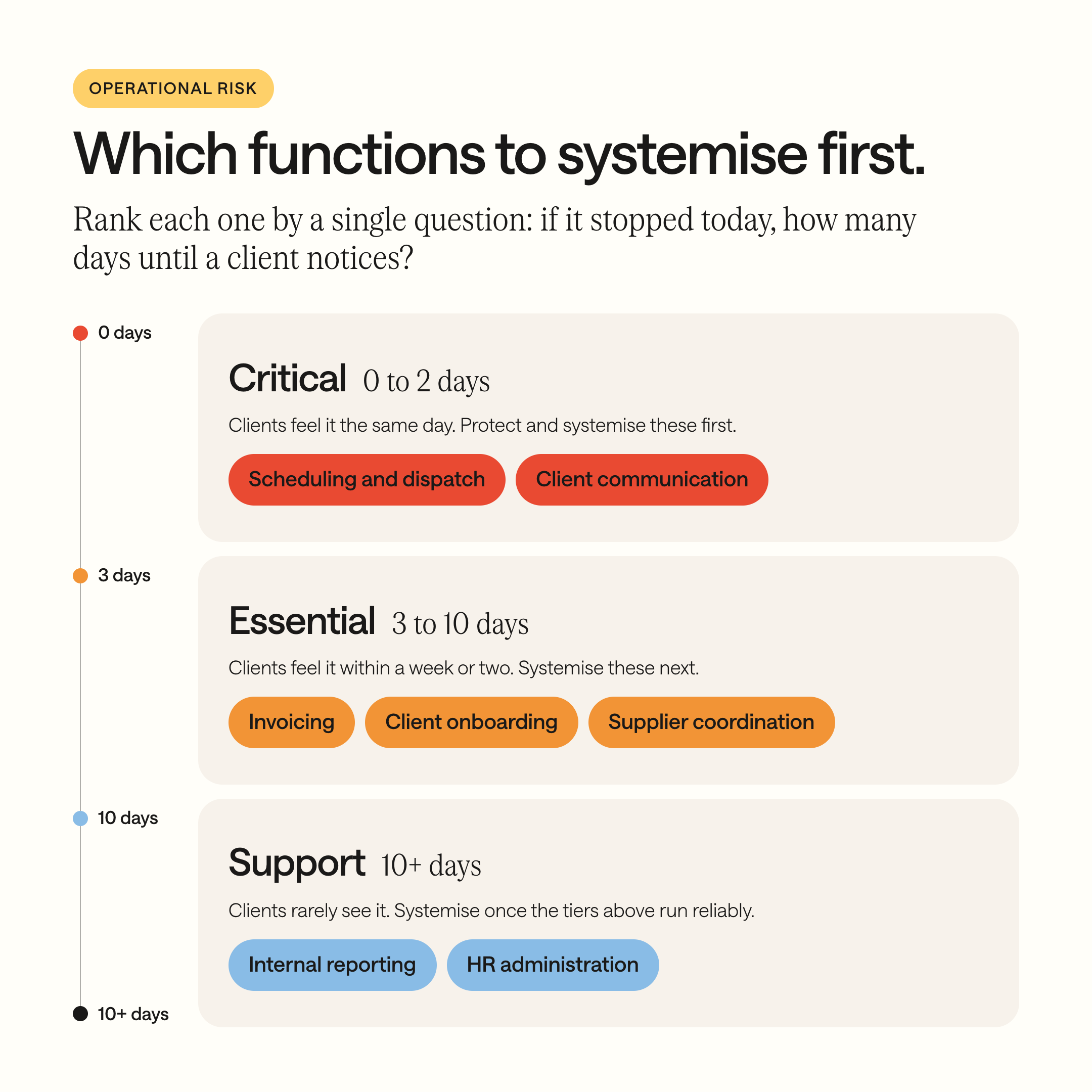
For each function, estimate honestly: if this stopped today, how many days until a client feels it?
0 to 2 days: Critical. Scheduling, dispatch, client communication usually land here.
3 to 10 days: Essential. Invoicing, onboarding, supplier coordination.
10 or more days: Support. Internal reporting, most HR administration.
This single question does more than any risk matrix. It tells you where to spend your attention and where not to.
Step 3: The single thing it depends on
For each function, name the one dependency that, if it disappeared, would stop the function. Be specific. Not "the team." A role. Not "our software." The named tool. Not "the supplier." The one subcontractor who does the specialist work.
If you cannot name a single dependency because the function could run through two or more routes, that function is resilient. Move on. If you can name one, you have found a single point of failure.

In the businesses we work with, the typical company under 100 people has three to five key-person dependencies. Each one is a function that stops the day that person is unavailable.
What are the five single points of failure in a small business?
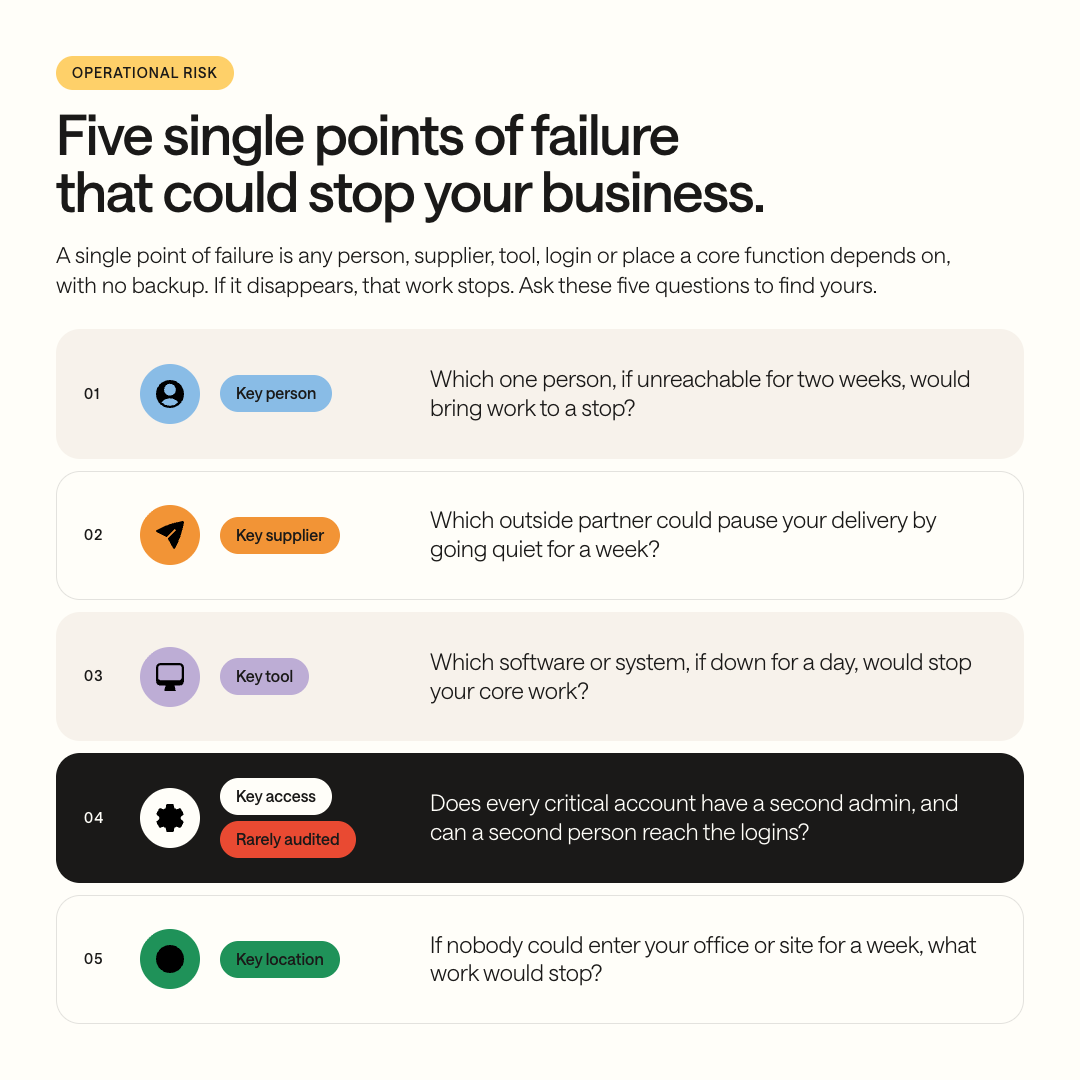
Every single point of failure we find in a business under 100 people falls into one of five types: a key person, a key supplier, a key tool, a key access credential, or a key location. Each one has a different question that reveals it and a different cheapest fix. Knowing the five types turns a vague worry into a checklist.
1. Key person
What it looks like: a function works only because one person knows how. The office manager who alone understands the invoicing workarounds. The project lead who holds every site status in his head. The founder who approves everything.
The revealing question: "If this person were unreachable for two weeks, what would stop?"
Why it is the most common: businesses grow around good people. Nobody plans the dependency. It accumulates.
2. Key supplier
What it looks like: a service business that does not think of itself as having a supply chain, until the one subcontractor who does the electrical work, the one freelancer who builds the reports, or the one staffing partner stops answering.
The revealing question: "Which external party could pause our delivery to clients by going quiet for a week?"
3. Key tool
What it looks like: the scheduling platform, the CRM, the spreadsheet with the formulas nobody else understands. If it is down, or the subscription lapses, or the file corrupts, the function waits.
The revealing question: "Which system, if it were unavailable for a day, would leave the team unable to do their core work?"
4. Key access
What it looks like: the person who set up the accounts holds the only admin login. The domain, the bank portal, the cloud storage, the scheduling tool, the social accounts. When they leave, go on holiday, or lose their phone, the business is locked out of itself.
The revealing question: "For each critical tool, is there a second admin, and are the credentials stored somewhere a second person can reach?"
This is the risk almost nobody checks, because it never fails until it fails completely.
5. Key location
What it looks like: the paper files in one office, the server in the back room, the only printer that handles the delivery notes, the team that cannot work if the building is inaccessible.
The revealing question: "If nobody could enter the main office for a week, which functions would stop?"
For most service businesses in 2026 this is the lowest risk of the five, because so much work is already cloud-based. But the paper exceptions are real, and they cluster in exactly the functions that touch clients and compliance.
A one-page handover removes most of the key-person risk. A second admin removes almost all of the access risk.
How do you build a one-page operational risk register?
A risk register for a business under 100 people is a single table with one row per single point of failure, five columns, and no more than fifteen rows. Function, dependency, type, days until a client notices, and the cheapest alternative. That is the whole document. If it needs a second page, it is too detailed to be maintained.
Here is what four filled-in rows look like. Fill in yours from Steps 1 to 3 above.
Scheduling
Depends on: Office Manager (person)
Client notices in: 1 day
Cheapest alternative: one-page handover and a second person trained
Site status
Depends on: Project Lead (person)
Client notices in: 2 days
Cheapest alternative: shared dashboard updated by the site leads
Specialist delivery
Depends on: Subcontractor X (supplier)
Client notices in: 5 days
Cheapest alternative: a second contact qualified and on file
Client records
Depends on: CRM admin login (access)
Client notices in: 1 day
Cheapest alternative: a second admin and a credential vault
Three rules for using it:
Sort by "days until a client notices." The rows at the top are where the next month's attention goes.
Prefer the cheapest alternative over the complete one. A one-page handover removes most of the key-person risk. A second admin removes almost all of the access risk. Total redundancy is not the goal and will cost more than the risk it prevents.
Review it when something changes, not on a calendar. New hire, departure, new tool, new supplier: open the register and update the row. That is the entire maintenance routine.
Where does AI fit in operational risk?
AI does not reduce operational risk. It inherits it. An AI assistant trained on the company's processes is only as available as the data and systems it reads from, and it cannot answer a question that lived only in a departed employee's head.
The reverse is also true. The work that reduces risk, documenting what key people know, getting credentials out of one person's phone, consolidating data so it does not live in one spreadsheet, is exactly the work that makes a business ready for AI. Same foundation, different reason to build it.
For the full picture on what AI needs from your operations: 95% of AI Projects Deliver Zero ROI. Here's Why, and What to Fix First.
Where to start
Step 1: List your core functions. Under twelve.
Step 2: For each, estimate days until a client notices.
Step 3: For each, name the single dependency. Where there is one, you have a single point of failure.
Step 4: Fill in the one-page register. Sort by days.
Step 5: For the top three rows, put the cheapest alternative in place this month.
Three single points of failure removed. That alone makes the business more resilient than most of its competitors, and it took an afternoon and a page.
Is the key person you? Read next: Is Your Business Ready to Run Without You? The Operational Succession Test
Key person risk in depth: Read next: If Your Best Employee Quits Tomorrow, What Breaks?
Is your key tool the real problem? Read next: You Do Not Have a Tool Problem. You Have a Process Problem.
Your Next Step
If there is one thing to take from this guide: the things that stop a small business are not disasters. They are dependencies. One person, one supplier, one tool, one login, one location, each carrying a function that has never been backed up because it has never failed. The risk is not that something dramatic happens. It is that something ordinary happens to the one thing nothing else can replace.
You now have the impact check, the five types, and the register. You can find your single points of failure this afternoon.
Removing them is the longer work. Documenting what the key person knows. Qualifying a second supplier. Getting credentials into a shared vault with a second admin. Building the dashboard so site status stops living in one head. Each of these competes with running the business, which is why most risk registers get written once and never acted on.
That is the work kwapso does. We find the dependencies, put them in order of what would hurt first, and build the alternatives sprint by sprint: the handover page, the shared dashboard, the second admin, the one data source that replaces the spreadsheet. We stay after the build, so the register stays true as people and tools change.
We become the digital department your business does not have.
Want to know what would actually stop your business? Book a structured operations call here.
Whether you take this on yourself or hand it to us, we hope this guide replaces a vague worry with a short, specific list.
FAQ
What is a single point of failure in a small business?
A single point of failure is any person, supplier, tool, credential, or location that a core business function depends on, with no documented alternative and no second person who could step in. In businesses under 100 people, the most common one is a key person, followed by a key access credential that only one employee holds.
How do I do a business impact analysis without a consultant?
List your core functions, then answer two questions for each: how many days until a client notices if it stopped, and what single thing does it depend on. Sort by the first answer. The rows at the top with a named single dependency are your priorities. The whole exercise fits on one page and takes an afternoon.
What is the difference between business continuity and operational risk?
Business continuity planning prepares for large disruptions such as outages, cyberattacks, or facility loss, and typically produces a formal plan with recovery targets. Operational risk, as kwapso uses the term, is narrower: the everyday dependencies on one person, supplier, tool, credential, or location that can stop a function without any disaster occurring. Small businesses are disrupted far more often by the second than the first.
How much risk documentation does a 30-person company need?
One page. A register with one row per single point of failure, listing the function, the dependency, the type, the days until a client notices, and the cheapest alternative. If it needs more than fifteen rows or a second page, it is too detailed to maintain and will not be updated.
Who should own operational risk in a small business?
A role, not a person, and ideally not the founder. The register should be owned by whoever already owns operations day to day, often the office manager or operations lead. The founder reviews it quarterly. If the founder is the only one who can update it, the register itself has become a single point of failure.
Is key person risk the same as a knowledge silo?
They overlap but are not identical. A knowledge silo is critical knowledge held by one person. Key person risk is any function that stops when one person is unavailable, which can be caused by a knowledge silo, by an access credential only they hold, or by an approval authority only they have. Every knowledge silo is a key person risk; not every key person risk is a knowledge silo.
Does being cloud-based remove operational risk?
No. Cloud tools remove most location risk, but they add tool risk (outages, lapsed subscriptions) and concentrate access risk (one admin login controls everything). A fully cloud-based business should still check who holds admin access to each system and whether a second person can reach the credentials.