Here is something that surprises most CEOs when we point it out: you cannot improve what you cannot see.
Your business runs dozens of processes every day. Client onboarding. Invoicing. Project handoffs. Scheduling. Purchasing. Complaints handling. Every one of them has steps, people, tools, decisions, and handoffs. And in most businesses, none of it is written down anywhere.
The work gets done because people know how to do it. They learned from someone who learned from someone, or they figured it out themselves. The process exists in their habits, their muscle memory, their shortcuts. It works. But it is invisible. You cannot measure an invisible process. You cannot find the friction in it. You cannot teach it to a new hire without sitting next to them for weeks. And you certainly cannot automate or improve what nobody has described.
An IDC study found that 76% of companies experience serious business risks due to poor document processes, including compliance failures and lost productivity. Fortune 500 companies lose an estimated $12 billion per year due to inefficiency caused by unstructured process management. For a mid-sized service business, the numbers are smaller but the pattern is identical: invisible processes create invisible waste.
This guide walks you through mapping a business process from scratch. No special software. No consulting frameworks. A pen, a whiteboard or a piece of paper, and the person who actually does the work.

You cannot improve what you cannot see. A process that lives in people's habits is a process that cannot be measured, taught, or improved.

Which process should you map first?
Do not try to map everything. That is how process documentation projects die: they start too big, produce a 200-page manual nobody reads, and get abandoned after three weeks. Start with one process. The right one.
Pick the process that meets the most of these criteria:
It causes the most daily frustration. The one your team complains about. The one that breaks every other week. The one where "it depends" is the answer to every question about how it works.
It involves the most people or handoffs. A process that touches three departments has more opportunities for friction, miscommunication, and delay than a process done by one person.
It costs the most. If you completed the cost exercise in Guide 2, look at your highest-cost manual processes. Those are your priority.
It is at risk of knowledge loss. If only one person knows how this process works, mapping it is both documentation and insurance. See Guide 4 for the knowledge silo diagnostic.
For most service businesses, the first process worth mapping is either client onboarding, project delivery, or invoicing. These are high-frequency, high-touch processes that involve multiple people and directly affect revenue and client experience.
The five questions that define any process
Before you draw a single step, answer these five questions. They set the boundaries of what you are mapping.
1. What triggers this process? Every process starts with something. A client signs a contract. An order comes in. A complaint is received. An employee submits a request. Name the specific event that sets the process in motion.
2. What does "done" look like? Every process ends with an outcome. The client is onboarded and has access to the system. The invoice is sent and recorded. The complaint is resolved and documented. Name the specific end state. If you cannot define "done," the process has no clear finish line, and that is part of the problem.
3. Who is involved? List every person (or role) who touches this process at any point. Not just the owner. Include the people who approve, review, hand off, receive, or get notified.
4. What tools or systems are used? List every tool the process touches. CRM, email, Excel, WhatsApp, accounting software, shared drive, physical paperwork. This often reveals that a single process passes through five or more tools, with manual data transfer between each one.
5. What are the known problems? Before mapping the steps, capture what the team already knows is broken. "The handoff between sales and delivery always loses information." "Nobody knows who approves the final version." "The client data has to be re-entered manually." These known pain points will show up in the map, but naming them first gives you something to validate against.
How do I map a business process from scratch?
Now you are ready to draw the flow. Here is the method we use. It works on a whiteboard, a sheet of paper, or a simple document.
Step 1: Walk the process with the person who does it
This is the most important step, and most process documentation guides skip it. Do not map the process from memory. Do not map how you think it should work. Map how it actually works today, including the workarounds, the exceptions, and the parts that make no sense.
Sit with the person who performs the process. Ask them to walk you through it from trigger to "done," step by step. In our experience, the most reliable approach is to observe the process happening in real time rather than reconstructing it from memory: what people remember doing and what they actually do are rarely the same thing. If that is not possible, have the person talk through it as if they are training someone who has never done it.
Sit with the person who performs the process. Ask them to walk you through it from trigger to "done," step by step. In our experience, the most reliable approach is to observe the process happening in real time rather than reconstructing it from memory: what people remember doing and what they actually do are rarely the same thing. If that is not possible, have the person talk through it as if they are training someone who has never done it.
Record it, take notes, and ask "and then what happens?" until you reach the end state.
Step 2: Write each step as a verb plus an object
Keep the steps simple and concrete. Each step is an action: someone does something to something.
"Sales rep enters client data into CRM." Not: "Client information is processed." The first version tells you who does it, what they do, and where they do it. The second version tells you nothing.
For each step, capture:
Who does it (which role or person). What they do (the specific action). Where they do it (which tool or system). How long it takes (estimate in minutes, even roughly). What can go wrong (the common error, delay, or exception at this step).
Step 3: Mark the handoffs
A handoff is any point where the work passes from one person to another, or from one tool to another. Circle these on your map. In most businesses, handoffs are where the process breaks. Information gets lost in the transfer. The next person does not know the first person finished. The data has to be manually re-entered in a different system.
If you completed the bottleneck diagnostic in Guide 7, you will recognize these friction points. If you have not, the map will reveal them now.
Step 4: Mark the decision points
A decision point is any place where the process branches: "If the client is new, do X. If the client is existing, do Y." Or: "If the amount is above €5,000, the CEO must approve. Below €5,000, the project lead approves."
Decision points that are not documented create inconsistency. Different people make different decisions at the same point, and nobody realizes the process has diverged.
Step 5: Review the map with the team
Show the completed map to everyone who touches the process. Ask: "Is this actually how it works?" You will almost always get corrections. "Oh, we also send a confirmation email at this step." "Actually, Maria handles step 3 now, not Thomas." "This part only applies to clients in Germany, for Austrian clients we skip it."
These corrections are the value. The map is not done until the people who do the work agree it reflects reality.

We built an interactive version of the operational health assessment that scores your process documentation maturity and shows you where to focus. Takes five minutes. Take the interactive operational health test here →
What to do with the map once you have it
A process map is not a deliverable. It is a diagnostic tool. Once you can see the process, three things become possible.
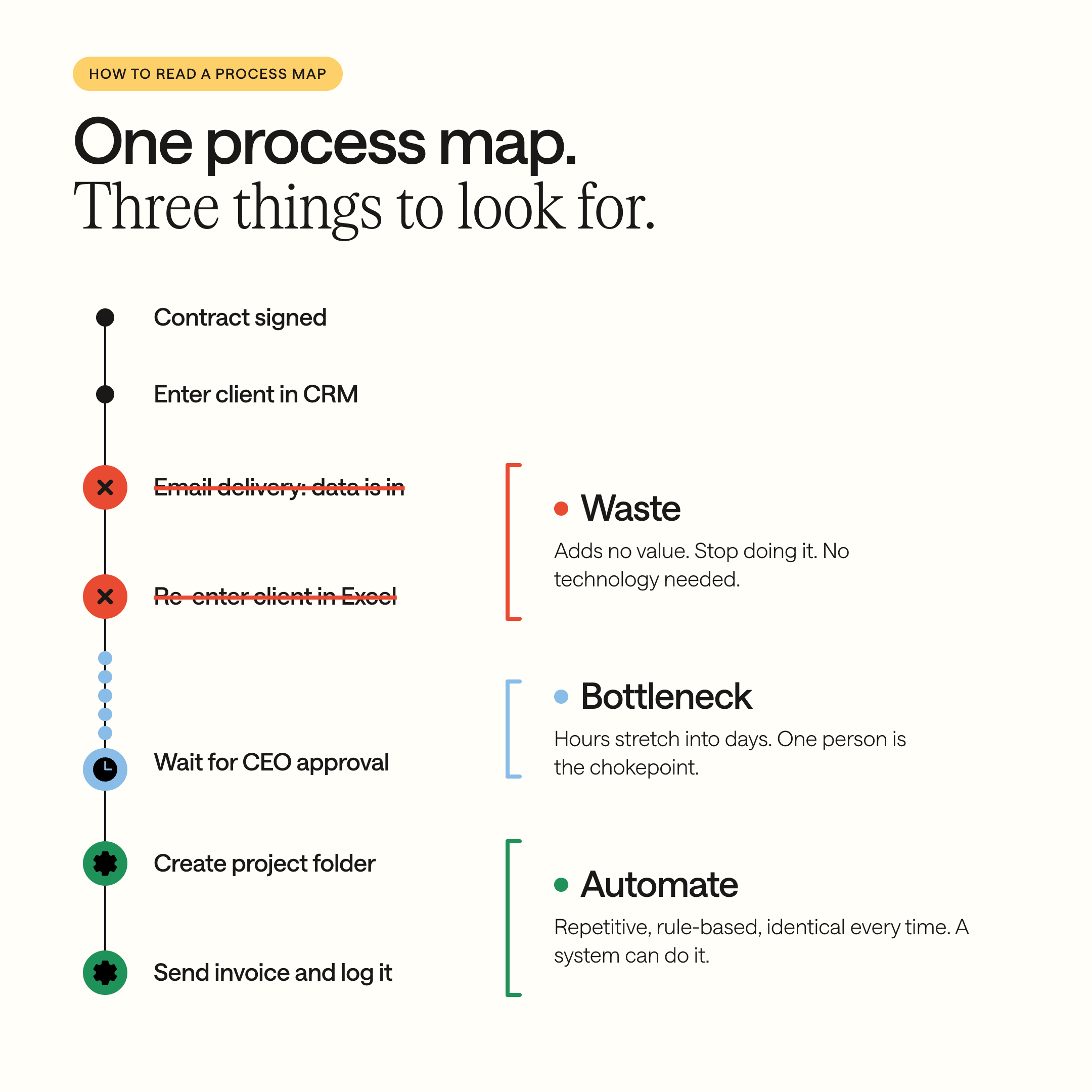
Find the waste. Look for steps that add no value: re-entering data that already exists somewhere, sending emails just to notify someone that a step is done, printing a document only to fill it and scan it again. These are candidates for elimination. You do not need technology to fix them. You need the decision to stop doing them.
Find the bottlenecks. Look for the places where work piles up, where one person is the chokepoint, where “waiting for approval” stretches from hours to days. The five types of bottlenecks (waiting, manual handoffs, searching, rework, person dependency) are described in detail in Guide 7.
Find the automation candidates. Look for steps that are repetitive, rule-based, and identical every time. “When a contract is signed, create a project folder with these five subfolders.” “When an invoice is approved, send it to the client and log it in the accounting system.” These are steps a system could do. But only after you have mapped them clearly enough to describe the trigger, the action, and the expected result. More on this in Guide 9.
A mapped process is also an AI-ready process
One line worth noting: a process that is mapped and documented is a process that AI can eventually learn from. An unmapped process is invisible to every system, including AI. The work you do in this guide is not just about efficiency today. It is the foundation for every operational improvement you will make in the future, including the ones that involve AI.
For the full picture on why AI depends on structured processes: 95% of AI Projects Deliver Zero ROI. Here’s Why, and What to Fix First.
76% of companies experience serious business risks due to undocumented processes, including compliance failures and lost productivity (IDC). An unmapped process cannot be measured, improved, taught to a new hire, or prepared for automation
What are the most common process mapping mistakes?
Mapping how it should work instead of how it actually works. The “should” version is aspirational. The “actually” version is where the problems live. Map reality first. Improve later.
Making it too detailed too early. Your first map should capture 10 to 20 main steps, not 80 micro-steps. You can zoom in on the problem areas later. A map nobody can read is no better than no map at all.
Mapping alone. A process map built by the CEO without the people who do the work will be incomplete and possibly wrong. The people in the process see things the CEO does not.
Mapping once and never updating. Processes change. People change. Tools change. A map from 2024 that nobody has reviewed is not documentation. It is decoration. Assign an owner to each documented process and schedule a simple review every six months. Without an owner, the map ages without anyone noticing.
Where to start
Step 1: Pick one process using the criteria above (most frustration, most handoffs, highest cost, or highest knowledge risk).
Step 2: Schedule 60 minutes with the person who performs it.
Step 3: Walk through the five framing questions together.
Step 4: Map the steps, handoffs, and decision points.
Step 5: Review with the team.
One process mapped. That alone gives you a tool you can use to find waste, identify bottlenecks, train new hires, and prepare for automation. Repeat for the next two highest-priority processes and you have covered the core of your operations.
Want to calculate how much your unmapped processes are costing you? Read next: Your Business Runs on Manual Work. Here’s What That Costs You Every Year.
Ready to identify the specific friction points in your mapped processes? Read next: Five Types of Bottlenecks That Are Bleeding Your Business, and How to Spot Them
Your Next Step
You cannot improve what you cannot see. A process that lives in people’s habits is a process that cannot be measured, taught, or improved. Mapping it makes it visible. Visibility makes everything else possible.
You now have the method: five framing questions, a step-by-step mapping process, and a clear starting point. You can map your first process this week.
Mapping is the first step. Redesigning the process, building the systems to support it, training the team on the new way of working, and maintaining the documentation over time is the sustained work that turns a one-time exercise into a lasting operational improvement.
If you want your processes mapped, improved, and built into systems your team actually uses, we start with a structured process audit across your operations. Then redesigned workflows. Then sprint-based delivery, with real progress every few weeks. We stay after the build.
Ready to make your operations visible? Book a structured operations call here.
Whether you take this on yourself or hand it to us, we hope this guide gives you the method to see what has been invisible, and the confidence to start.
FAQ
What is process mapping and why does it matter?
Process mapping is documenting how work actually flows through a business, step by step from trigger to completion, including who does each step, which tools are used, and where handoffs occur. 76% of companies experience serious business risks from undocumented processes, including compliance failures and lost productivity (IDC). An unmapped process cannot be measured, improved, taught to new hires, or automated.
How do I map a business process from scratch?
Start by answering five framing questions: What triggers the process? What does “done” look like? Who is involved? What tools are used? What are the known problems? Then walk through the process step by step with the person who actually does the work, not from memory, but by observing or having them narrate it as if training someone new. Record each step as a specific action: who does what, where, and how long it takes.
Which process should a business map first?
The one that meets the most of these criteria: it causes the most daily frustration, involves the most handoffs between people or systems, costs the most in time or errors, and carries the highest risk of knowledge loss. For most service businesses, client onboarding, project delivery, or invoicing are the strongest starting points because they are high-frequency, high-touch, and directly affect revenue.
What is the biggest mistake when documenting processes?
Mapping how the process should work instead of how it actually works today. The aspirational version hides the real problems: the workarounds, exceptions, and steps that exist because “that’s how we’ve always done it.” Map reality first, including the parts that make no sense. The gap between how it should work and how it actually works is where the waste, bottlenecks, and improvement opportunities live.



.jpg)


