You have a good team. They work hard. They care about the work. And yet, things take longer than they should. Projects stall. Deadlines slip. Simple tasks eat up entire mornings. Clients wait. The team stays late.
The instinct is to blame capacity. "We need more people." Or discipline. "The team needs to be more organized." Or technology. "We need a better tool."
Usually, the answer is none of these. The answer is bottlenecks.
A bottleneck is any point in a process where work slows down, piles up, or stops because the flow is blocked. Not because people are lazy. Because the process itself has friction built into it, friction that nobody designed and nobody measures.
Research from Databox found that 52.8% of business leaders say long-term bottlenecks have the greatest impact on growth. Kroolo's analysis shows that supply chain disruptions alone cost companies approximately 8% of annual revenue. And across the businesses we work with, we consistently find that bottleneck identification reveals 20+ hours per week of wasted team capacity.
The good news: bottlenecks follow patterns. Once you know the five types, you can spot them in your own business in an afternoon. This guide names each one, shows you what it looks like in practice, and gives you a checklist to identify where your operations are leaking.
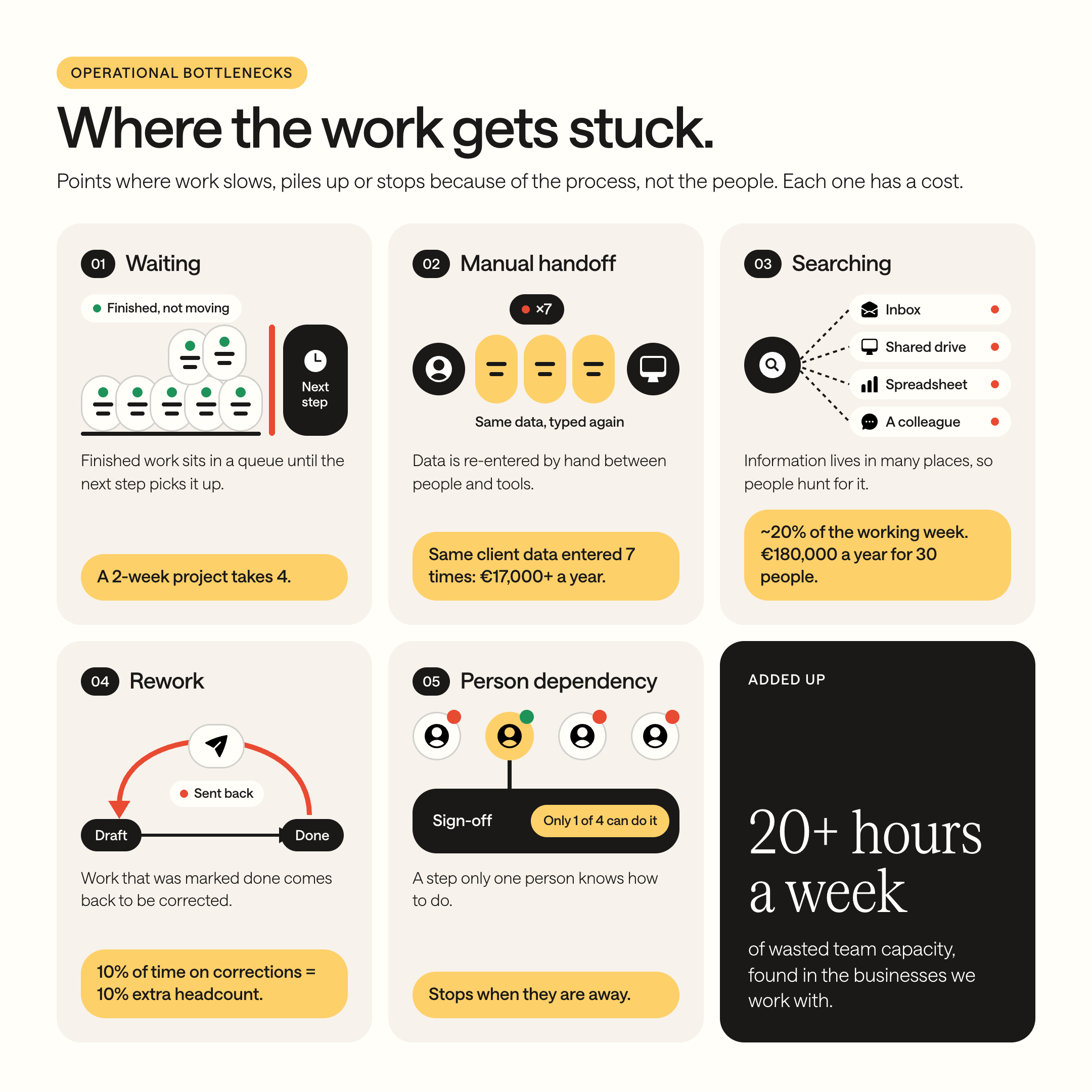

Your team is not the bottleneck. Your processes are. The five types of friction described here exist in every business. The question is not whether they are there. The question is whether you have measured them and decided what to do about them.

Type 1: Waiting
What it looks like
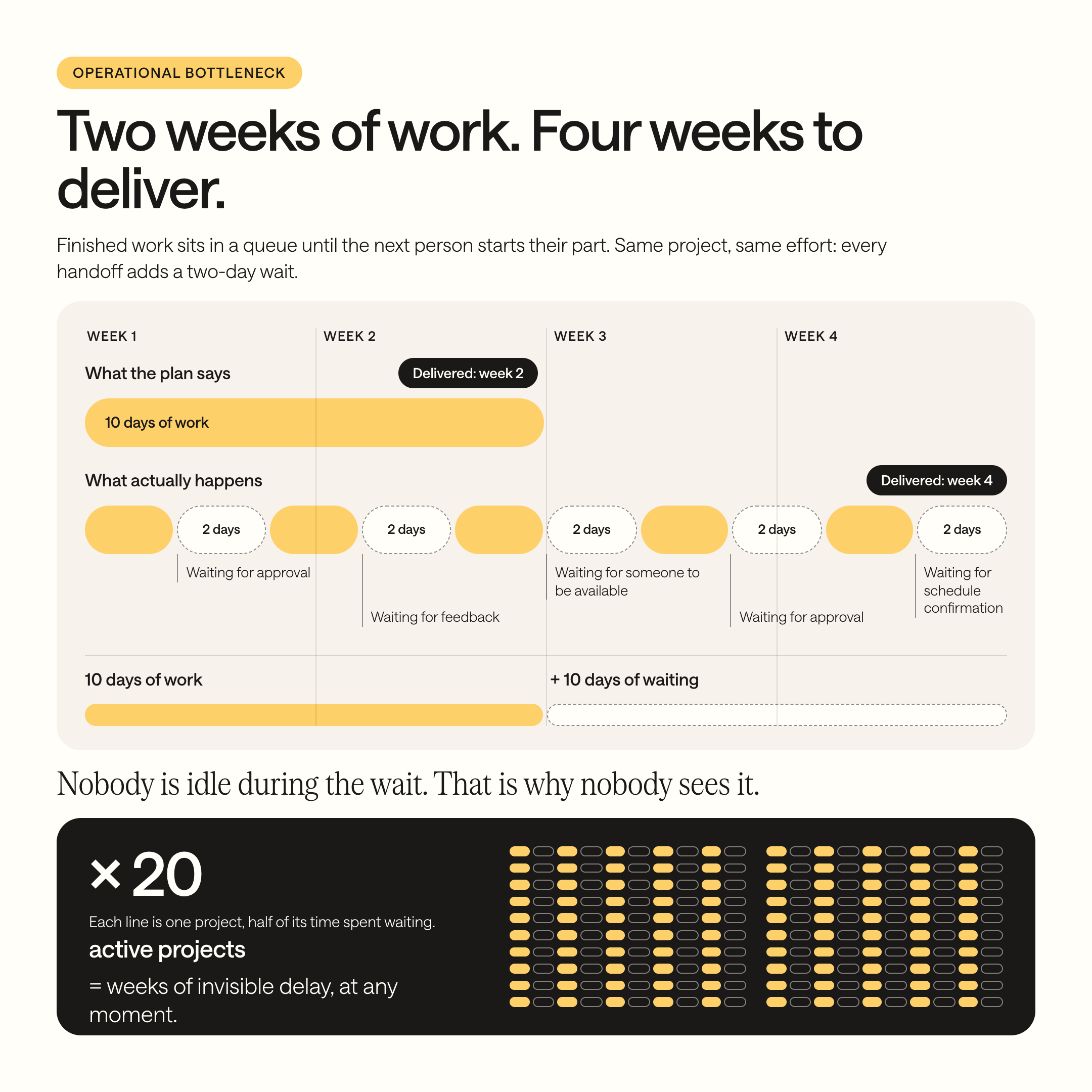
Work is done. But it sits in a queue because the next person has not started their part. An invoice is prepared but waits three days for the CEO’s signature. A client proposal is written but waits a week for someone to review it. A project is ready for delivery but waits because nobody has confirmed the schedule with the client.
Waiting is the most common bottleneck and the easiest to miss. It does not feel like a problem because nobody is idle during the wait. Everyone is busy with other things. But the work itself is stuck, and the cumulative delay compounds across every project.
How to spot it
Ask: “Where in our processes does completed work sit and wait before the next step begins?” If the answer involves “waiting for approval,” “waiting for feedback,” or “waiting for someone to be available,” you have a waiting bottleneck.
What it costs
A project that could be delivered in two weeks takes four because each handoff includes a two-day wait. Multiply that by twenty active projects and the business is carrying weeks of invisible delay at any given moment.
Type 2: Manual handoffs
What it looks like
Work passes from one person to another, or from one tool to another, and information gets lost, distorted, or re-entered in the transfer. A sales rep closes a deal and sends the details to the project manager by email. The project manager re-enters the data into a spreadsheet. The spreadsheet goes to the operations team, who re-enter it into the scheduling tool. Each handoff introduces delay, duplication, and the chance of error.
How to spot it
Ask: “Where does information pass from one person or system to another? Does it arrive complete and accurate, or does the receiving person have to chase missing details?” If the answer involves “I always have to follow up for the rest of the information,” you have a handoff bottleneck.
What it costs
Every manual handoff is a data re-entry event and a potential error event. In the insurance example from Guide 2, a single onboarding process required entering the same client data seven times, costing over €17,000 per year in direct labor alone. The errors from those manual transfers cost another €4,000 in rework.
Type 3: Searching
What it looks like
Someone needs a piece of information to do their work and cannot find it. They search through email. They check the shared drive. They open three spreadsheets. They ask a colleague. They wait for a reply. Twenty minutes later, they have the file they needed and can begin the actual task.
Searching is invisible on any timesheet. Nobody logs “spent 20 minutes finding the right document.” But it happens dozens of times per day across the team.
How to spot it
Ask: “How long does it take to find a client record, a project file, or a specific number when someone needs it?” If the answer is anything other than “a couple of minutes in one system,” you have a searching bottleneck. If the answer involves “it depends on who you ask,” you have a searching bottleneck combined with a knowledge silo (see Guide 4).
What it costs
McKinsey Global Institute’s Social Economy report estimates that the average employee spends nearly 20% of their working week searching for internal information and tracking down colleagues who can help. For a team of 30 people at an average cost of €30 per hour, that is roughly €180,000 per year spent looking for things that should be findable in seconds.
This connects directly to the data architecture question in Guide 5. When information lives in too many places with no clear primary source, searching becomes a daily tax on every member of the team.
Type 4: Rework
What it looks like
Work gets done, then has to be done again because of errors, miscommunication, or changing requirements. An invoice is sent with the wrong amount. A project deliverable does not match what the client expected. A report contains outdated numbers because someone used the wrong spreadsheet.
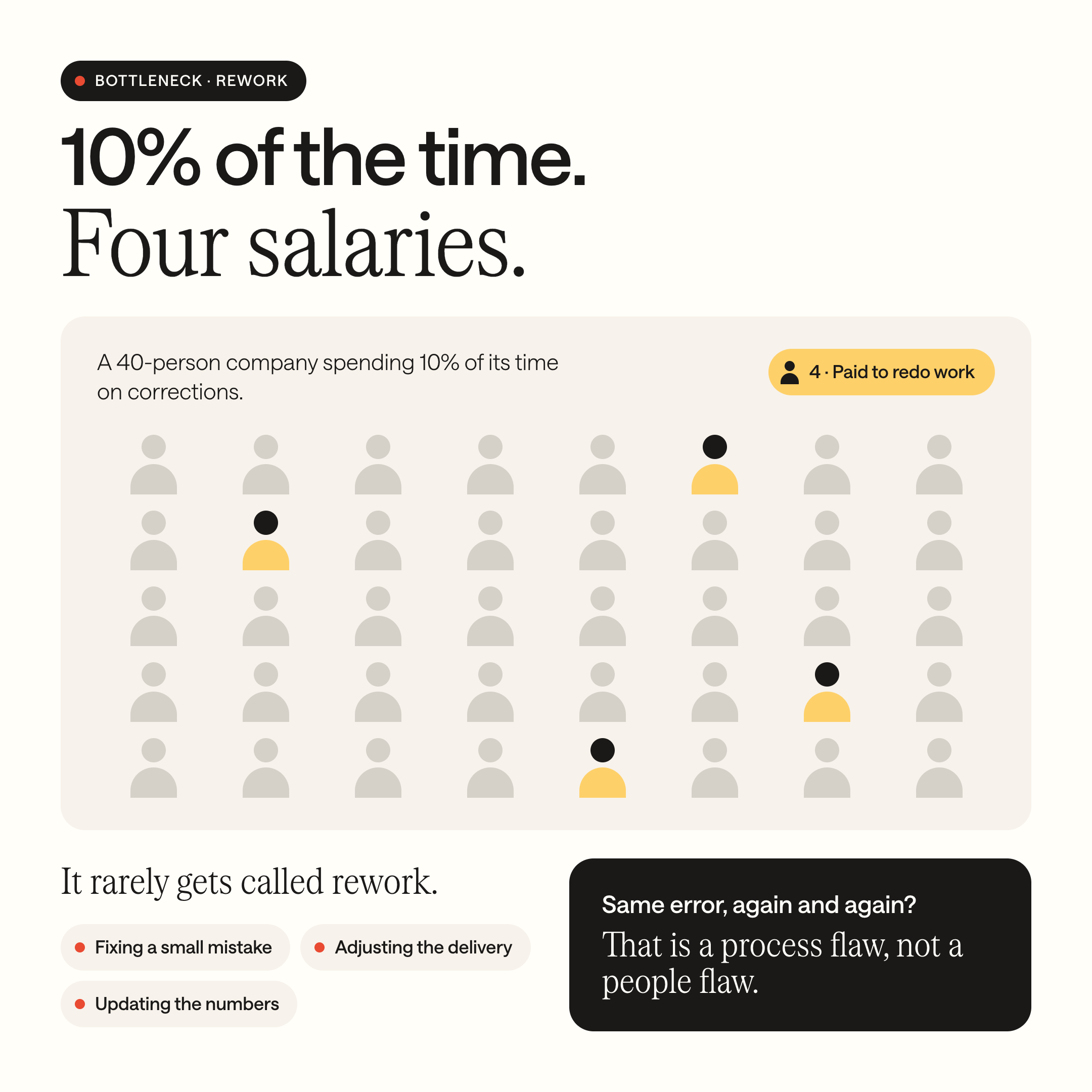
Rework is the bottleneck that hides behind other problems. It rarely gets labeled as rework. It gets labeled as “fixing a small mistake,” “adjusting the delivery,” or “updating the numbers.” But each correction cycle consumes time that was supposed to go toward new work.
Ask: “How often does completed work come back because something was wrong, missing, or misunderstood?” If the answer is “regularly” or “it happens more than we’d like,” you have a rework bottleneck. Also ask: “What percentage of our corrections are caused by the same type of error?” Recurring errors point to a process flaw, not a people flaw.
What it costs
Rework costs are always underestimated because they are spread across many small corrections rather than one large failure. But the cumulative cost is significant. A team that spends 10% of its time on corrections and revisions is effectively paying for 10% more headcount than it needs. For a 40-person company, that is the equivalent of four full-time salaries going toward doing work that should not have been necessary.
Type 5: Person dependency
What it looks like
A step in the process can only be done by one person. Not because the task requires special skill, but because nobody else has been trained, nobody else has access, or nobody else knows the workaround. When that person is busy, sick, or on holiday, the process stops.
This is the bottleneck that connects most directly to knowledge silos. The person is not the problem. The dependency is the problem. And it gets worse over time, because the more the team relies on one person for a step, the less incentive there is to train someone else.
How to spot it
Ask: “Which steps in our processes can only be done by one specific person? What happens when that person is unavailable?” If the answer involves “we wait until they are back” or “nobody else knows how,” you have a person dependency bottleneck.
What it costs
Person dependency does not just cost money in delays. It costs opportunity. The person everyone depends on cannot grow into a new role, work on strategic projects, or take a real holiday because the process requires them personally. They become trapped by their own competence. And the business becomes structurally fragile because of it.
For a deeper look at person dependency and how to diagnose it: If Your Best Employee Quits Tomorrow, What Breaks?

52.8% of business leaders say long-term bottlenecks have the greatest impact on growth (Databox). Across our client base, bottleneck identification consistently reveals 20+ hours per week of wasted team capacity: capacity that is already paid for but going to friction, not work.
How do I find bottlenecks in my business processes?
For each of your core processes (start with the ones you mapped in Guide 6, or pick the three that cause the most daily frustration), run through these questions:
Waiting
☐ Does completed work sit idle before the next step begins?
☐ Are approvals or reviews causing delays longer than one day?
Manual handoff
☐ Is information re-entered manually between people or tools?
☐ Does the receiving person regularly chase missing details?
Searching
☐ Does finding a file, record, or number take more than two minutes?
☐ Does the answer to “where is this information?” depend on who you ask?
Rework
☐ Does completed work regularly come back for corrections?
☐ Are the same types of errors recurring?
Person dependency
☐ Can this step only be done by one specific person?
☐ Does this process stop when that person is unavailable?
Count the checkmarks per type. The type with the most checkmarks is your most critical bottleneck category. Start there.

Bottleneck Checklist
A one-page printable PDF version of the diagnostic checklist above. Bring it to your next process review or team meeting, work through it together, and mark where the friction is.
Thank you! Your submission has been received!
Oops! Something went wrong while submitting the form.
Thank you. Your download should start automatically.
Oops! Something went wrong while submitting the form.
What to do once you have found them
Finding bottlenecks is the first step. Fixing them follows a clear priority:
First, eliminate. Some bottlenecks exist because the step should not exist at all. An approval that adds no value. A data re-entry that could be replaced by connecting two tools. A report that nobody reads. Before you optimize, ask: “What happens if we remove this step entirely?” If the answer is “nothing breaks,” remove it.
Second, restructure. Some bottlenecks exist because the process was never designed. It evolved. Handoffs happen in a certain order because “that is how we started doing it,” not because that order makes sense. Rework happens because the person doing step 3 does not have the information they need, which was available at step 1 but never passed along. Restructuring the flow often eliminates the bottleneck without any technology.
Third, automate. Some bottlenecks exist because a human is doing a task that a system could do faster and without errors. Sending a notification when a step is complete. Moving data from one tool to another. Generating a standard document from a template. These are automation candidates, but only after the unnecessary steps have been eliminated and the flow has been restructured.
This is the eliminate, streamline, then automate sequence covered in full in Guide 9.
AI cannot fix a bottleneck it cannot see
One line worth keeping in mind: AI does not find bottlenecks. Process mapping finds bottlenecks. AI can help optimize a process that is already mapped and structured, but it cannot see the waiting, the manual handoffs, the searching, the rework, or the person dependency that nobody has documented.
Before you ask “can AI help here,” ask “is this bottleneck caused by missing data, a broken handoff, or a person dependency?” The answer determines whether the fix is structural, procedural, or technological. Most of the time, it is the first two.
For the full picture on why structure comes before technology: 95% of AI Projects Deliver Zero ROI. Here’s Why, and What to Fix First.
Your Next Step
Your team is not the bottleneck. Your processes are. The five types of friction described here exist in every business. The question is not whether they are there. The question is whether you have measured them and decided what to do about them.
You now have the five types, the diagnostic questions, and the checklist. You can identify your top bottlenecks this afternoon.
Eliminating bottlenecks, restructuring workflows, connecting systems, and building the operational infrastructure to prevent them from returning takes focused, sustained work. The diagnosis is the easy part. The implementation is where the results live.
If you want to find and fix the bottlenecks in your operations, we start with a structured process audit that maps every workflow and identifies every friction point. Then a clear plan for what to eliminate, restructure, and automate. Sprint-based delivery. We stay after the build.
Ready to find out where your operations are leaking? Book a structured operations call here.
Whether you take this on yourself or hand it to us, we hope this guide gives you the language to name what is slowing you down, and a clear place to start fixing it.
FAQ
What are the most common types of operational bottlenecks?
Five types account for most operational friction: waiting (completed work sits idle before the next step begins), manual handoffs (information gets lost or re-entered between people or systems), searching (time spent finding files, records, or data), rework (completed work redone due to errors or miscommunication), and person dependency (a process step that only one person can perform). These patterns appear in every business regardless of industry or size.
How much do bottlenecks cost a business?
McKinsey estimates the average employee spends nearly 20% of their working week searching for and gathering information. For a 30-person team at €30/hour, that single bottleneck type costs roughly €180,000 per year. Across all five bottleneck types, kwapso consistently finds 20+ hours per week of wasted team capacity per business. 52.8% of business leaders say long-term bottlenecks have the greatest impact on growth (Databox).
How do I find bottlenecks in my own business?
Ask two diagnostic questions per bottleneck type: Does completed work sit idle before the next step? Is information re-entered manually between systems? Does finding a file take more than two minutes? Does completed work regularly come back for corrections? Can certain steps only be done by one specific person? The bottleneck type with the most “yes” answers is your most critical friction category and the place to start.
Are bottlenecks caused by employees or by processes?
By processes. Bottlenecks exist because the workflow has friction built into it that nobody designed and nobody measures. A person everyone depends on is not a people problem. It is a structural dependency problem. The fix is redesigning the flow (eliminating unnecessary steps, reducing handoffs, documenting decision criteria), not asking the team to work harder or faster.